SurveyMonkey is a cloud-based survey service available to Capilano University (CapU) employees.
Use SurveyMonkey to easily create surveys, quizzes, and polls for any audience. Gather feedback via weblink, email, mobile chat, social media, and more. Automatically analyze your results and get powerful analysis features. Export your results or integrate your data with your favourite apps.
SurveyMonkey is available to all employees, and is primarily meant for administrative purposes. The RedCap survey tool is also available, and is primarily intended for academic and research purposes..
The first time you log in to Capilano University's SurveyMonkey Enterprise service you will need to create an account.
Log in to SurveyMonkey
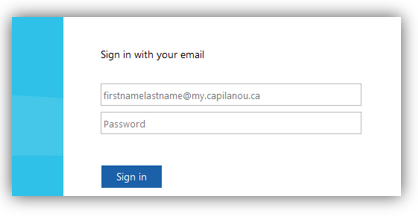
- If directed, enter your username and password on the CapU login page:
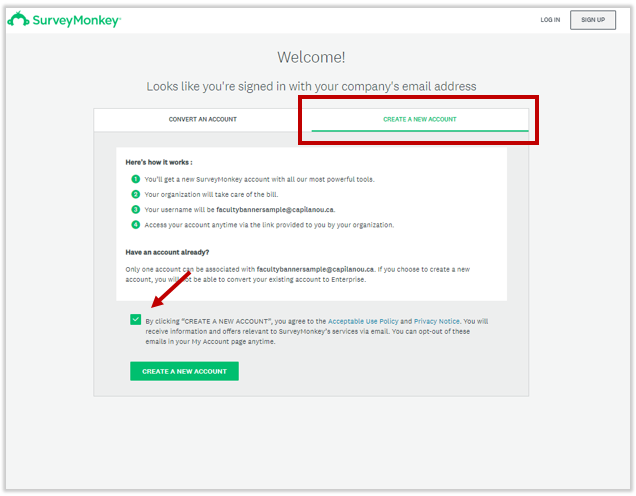
- Once logged you should be directed to the SurveyMonkey welcome page.
Select the Create a new account tab, check the agreement checkbox and click on the "Create a new account" button.
PLEASE NOTE: Existing personal accounts cannot be converted to your CapU account as personal account data is stored in the United States and cannot be migrated to a Canadian server.
- Your account should now be created. If successful you should see the following screen prompting you to create your first survey. Please contact IT Help to report any issues creating your account.
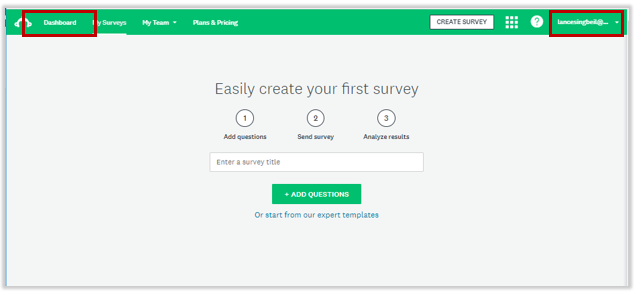
- Click on the Dashboard link to view your account dashboard.